LANDR - Master & Release Music
- 4.6
- Rating
- 100.00K
- Installs
- Free
- Price

 Analysis by App-foxy
I approached LANDR - Master & Release Music as a practical companion for the part of music-making that starts after the creative work is finished. It is a free Music & Audio app from LANDR Audio, built for musicians who want to master, distribute, and share songs without staying tied to a desktop studio. My first impression was that it makes the release process feel less scattered: instead of treating mastering, delivery, and sharing as completely separate jobs, it puts them in the same mobile-focused workflow.
That convenience is the main reason I would recommend trying it. It is not a replacement for careful mixing, critical listening, or a full production setup, but it can be useful when I need to check a finished track, prepare a release task, or keep an idea moving while I am away from my computer. The app is rated for Everyone, supports devices running Android 10 or later, and its current version is 2.15.5. Those details matter because this is a tool I would use around existing music habits, not necessarily as the only place where I create.
How I use LANDR as a baseline release workflow
My most reliable approach begins before opening the app. I finish the mix first, export a clean version, and listen to it in more than one environment. That preparation makes the mobile stage more useful. If I upload a track that still has obvious balance problems, mastering cannot magically repair the arrangement. LANDR is most helpful when I treat it as the final polish and release-management step rather than as a rescue button for an unfinished mix.
You May Also Like

 Pandora - Music & Podcasts
Pandora’s Music Is Easy to Start, but Harder to Recover
Pandora’s strength is its low-effort path from a seed to a station. Its weak spot is how much confidence it asks you to place in connection, setup, and quiet recovery.

 8 Ball Pool
 Is Built on Rivalries, Rematches, and Routine
A close look at the rivalries, rematches, shared routines, and unanswered safety questions that turn a quick pool match into a persistent mobile community.

 Samsung Music
’s Quiet Strength Is Playing What You Already Own
Its reach comes less from spectacle than from dependable access to a personal library. That simplicity is both the app’s strongest retention engine and its ceiling.

 AccuWeather: Weather Radar
AccuWeather Review: A Quick, Clear Forecast for Everyday Decisions
For everyday plans, the best forecast is the one you can understand quickly. AccuWeather makes rain timing, radar, and local conditions easy to act on, with a few trade-offs.

 Hill Climb Racing
Why Hill Climb Racing Still Turns Crashes Into One More Run
A tiny car, a bumpy hill and one more upgrade: Hill Climb Racing keeps resurfacing because its simple chaos makes every near-miss feel personal.

 AliExpress - Shopping App
AliExpress Makes Global Shopping Feel Personal, but Shoppers Bear the Risk
AliExpress turns a global marketplace into a pocket-sized discovery engine. Its reach is useful, its shopping loop compelling, and its trade-offs easy to miss.
More From Our News Desk
View All News


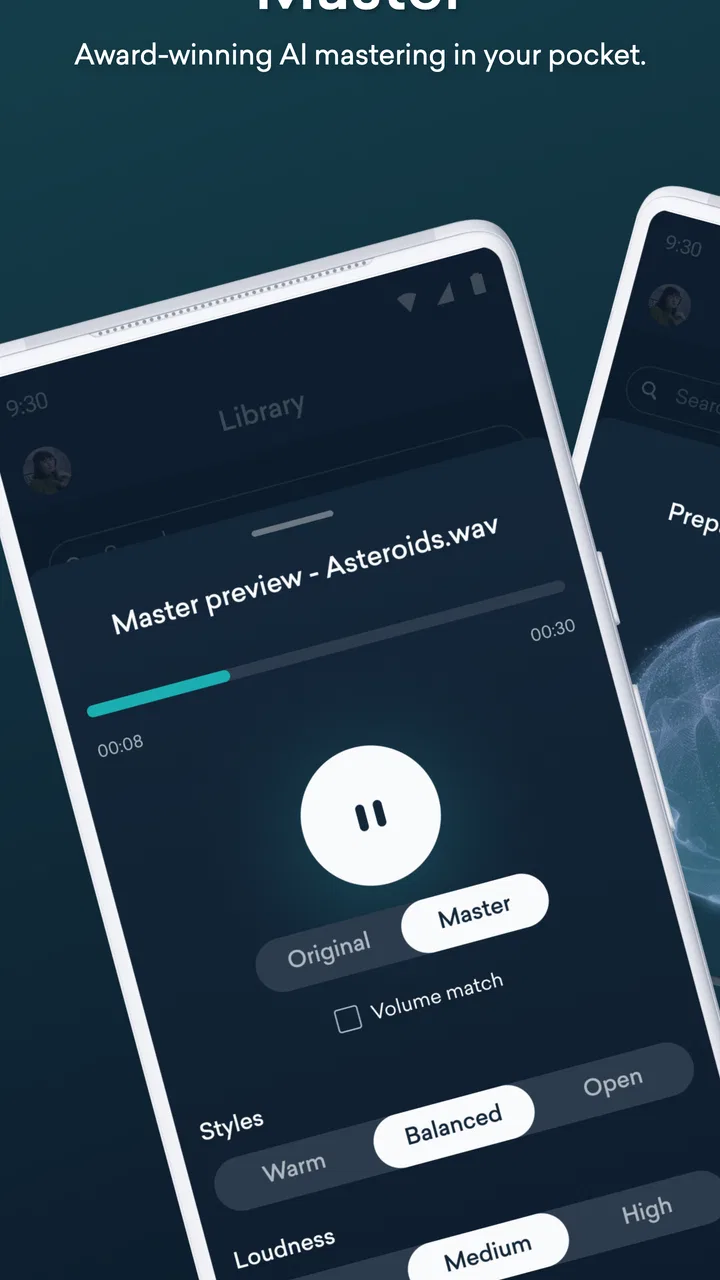
Once the track is ready, I use the app to keep the process moving in a simple order: bring in the finished audio, evaluate the mastering result, decide whether it represents the song honestly, and then continue toward sharing or distribution when appropriate. This sequence sounds straightforward, but it prevents a common mistake: adjusting a master repeatedly before deciding whether the underlying mix is actually the problem.
The strongest everyday use case is a musician working alone. Imagine finishing a song late in the evening, exporting it from a laptop, and noticing the next morning that the vocal feels buried on headphones. Instead of reopening the entire project immediately, I can use the mobile app to review the track in a different setting and make a more informed decision about whether the issue is broad enough to require a new mix. That second opinion is valuable, even when the final answer is to return to the original session.
I also see a place for it in a small release routine. An independent artist may have several songs at different stages: one being mixed, one ready for mastering, and another waiting to be shared privately. Keeping these jobs in a single music service can reduce the mental load of remembering which desktop project contains what. The app does not remove the need for organization, but it can make the handoff between “finished enough to review” and “ready to present” more convenient.
There is an important distinction between mastering for a quick preview and mastering for a public release. For a preview, I care about speed and whether the track communicates its energy. For a release, I become more cautious about tonal balance, dynamics, transitions, and whether the result still sounds like my mix. I would not approve a master simply because it sounds louder or more exciting during the first listen.
That habit is especially useful with electronic music, pop, hip-hop, and other styles where a more forceful master can seem impressive immediately. I compare the processed result with the original at a similar listening level. If the mastered version only feels better because it is louder, the comparison is misleading. LANDR can fit into this check, but the judgment still belongs to me.
What the free entry point means in practice
The app is free to install, which makes it easy to test without committing money at the beginning. However, in-app purchases range from $5.99 to $69.00 per item, so I would not assume every part of the wider workflow is included at no cost. Before building a release schedule around it, I would inspect the available purchase choices and identify exactly which action I need. That is a more sensible approach than paying first and discovering later that a particular release plan requires a different option.
This pricing structure also affects who should use it. A curious beginner can explore the workflow with relatively little friction, while an artist preparing several releases should compare the total cost of the required services with other distribution or mastering choices. The app may still be convenient, but convenience has a value that should be weighed against how often I release music and how much control I need.
The audience size gives the app a useful level of visibility: it has more than 100 thousand installs and an average rating of 4.6 from around 3.7 thousand ratings. I read that as a sign that the basic idea works for many users, not as proof that every musician will get the same result. A mobile mastering tool can be perfectly suitable for one workflow and frustrating for another, especially when expectations about control are very different.
Settings and listening checks worth making before I trust a master
The most important “setting” is often outside the app: the listening level. I keep the volume moderate when comparing versions, then return later for a quieter check. Excessive volume makes bass and brightness feel more impressive than they really are. It can also hide a vocal that becomes tiring after several minutes. A repeatable listening level gives me a more stable reference than changing the phone volume every time a new version appears.
I also check the track on headphones and a small speaker. Headphones reveal edits, harsh upper frequencies, and low-end details that a small speaker cannot reproduce. The speaker gives me a better idea of whether the vocal, snare, or main hook remains clear in an ordinary room. LANDR is useful in this process because it lets me evaluate a finished audio file away from the studio, but I still want both kinds of listening before deciding.
Another setting worth considering is the source file itself. I use the highest-quality export available from my production session rather than sending a compressed preview when I have a clean master file. I keep the arrangement, fades, and silence exactly as intended, because a mastering service cannot know whether an abrupt ending or a long pause is artistic or accidental. Checking these details before upload saves time and avoids blaming the processing for an export mistake.
I am also careful with tracks that already have aggressive limiting. If the mix is pushed hard before it reaches mastering, there may be little room left for useful improvement. In that situation, I would go back to the project and create a more sensible pre-master rather than expecting the app to restore dynamics that were removed earlier. This is one of the clearest boundaries between a convenient mastering workflow and a full mixing environment.
For an album or a group of singles, consistency deserves separate attention. I do not judge every song in isolation. I listen to transitions, perceived loudness, vocal position, and the overall emotional shape of the collection. A master that sounds excellent alone may feel too bright or too forceful beside the next track. LANDR can help with individual files, but the artist still needs to make the broader sequencing decision.
I would also keep an original export and a clearly named working copy. That simple habit protects the mix from confusion when I am comparing versions on a phone. A useful naming pattern might include the song title, mix date, and whether the file is a pre-master or a reviewed master. This is not a flashy feature, but it is exactly the kind of repeatable practice that prevents mistakes when several songs are moving toward release at once.
When mobile review is better than another desktop session
There are moments when using a phone is an advantage rather than a compromise. I can listen during a commute, between rehearsals, or in the same room where friends might hear the song for the first time. Those contexts reveal whether the track communicates outside the carefully controlled studio environment. I would not use a noisy commute for final technical approval, but it can expose whether the hook arrives quickly enough or whether the vocal disappears in ordinary background sound.
Mobile review is also helpful for collaboration. If I send a draft to a bandmate or vocalist, I can discuss the same version while away from the studio instead of describing a file that only exists on my computer. The app’s sharing focus makes that kind of exchange more natural than keeping every conversation tied to a production workstation. I would still confirm final details in the main project, but the mobile step can shorten the feedback loop.
Faster patterns I would build into a repeatable routine
Experienced use is less about pressing buttons quickly and more about removing avoidable decisions. I would create a short checklist and follow it for every track: confirm the correct file, listen to the opening and ending, compare the unprocessed and processed versions, check headphones and speaker playback, and write down one specific reason for accepting or rejecting the result. This keeps me from making vague judgments such as “it feels better” without knowing why.
For a single release, I might review the track in three passes. The first pass is emotional: does the song still have the intended impact? The second is technical: are there obvious harsh, muddy, or unbalanced areas? The third is practical: does the file behave well in the places where people are likely to hear it? Separating these questions makes the process faster because I am not trying to solve every issue at the same time.
A useful shortcut is to compare only meaningful sections rather than replaying the entire song after every decision. I focus on the quietest important passage, the busiest chorus, and the ending. Those moments usually reveal whether the master is preserving contrast and clarity. I then listen to the full track once before approving anything. This approach saves time while still checking the sections most likely to expose problems.
For artists releasing regularly, I would keep a small reference playlist of songs that represent the desired direction. It should include tracks with a similar mood or arrangement, not just famous songs that are mastered loudly. The purpose is to remind me what balance I am aiming for. I would use references as listening guides, not as targets to copy, because a different arrangement naturally needs a different treatment.
Another efficient pattern is to separate creative approval from administrative preparation. First I decide whether the song sounds right. Only after that do I spend time preparing release information and sharing it. Mixing those jobs together encourages premature release decisions, especially when the excitement of seeing a song move forward distracts from unresolved audio issues.
The app is particularly convenient for a musician who records in bursts. I can finish a vocal or instrumental part, export a candidate, and continue the review process without reopening a large project. That does not mean I should rush. It means the next step is available when my attention is elsewhere. The best productivity gain comes from maintaining momentum while preserving a deliberate approval habit.
Where the usual alternatives still have an advantage
A desktop digital audio workstation remains the better choice for detailed mixing. If I need to automate a vocal, repair a noisy recording, reshape a kick drum, or make a precise equalization change, I want access to individual tracks and plugins. LANDR works later in the chain. Comparing it directly with a full workstation is unfair because they solve different problems.
A traditional mastering engineer is a stronger option when the release is especially important, the mix is complex, or I want an independent human perspective. An experienced engineer can explain why a problem exists and suggest a change in the mix. The app is faster and more accessible, but it cannot replace that kind of conversation and musical interpretation.
Other online mastering services may suit someone who wants more manual controls, a different sound, or a closer consultation process. I would choose LANDR when I value an integrated route from finished audio toward sharing and distribution. I would look elsewhere when detailed intervention, ongoing feedback, or a highly customized mastering relationship matters more than speed.
Advanced limits that should shape expectations
The biggest limitation is not necessarily a missing button; it is the danger of treating automated processing as an objective answer. Mastering is partly technical and partly aesthetic. A result can be clean, loud, and polished while still being wrong for the song. I pay attention to whether the dynamics support the arrangement and whether the processing changes the emotional center. If the chorus loses its lift or the verse becomes too dense, I would rather revise the mix.
Genre also changes the trade-off. A sparse acoustic recording may expose tonal shifts more clearly than a dense electronic arrangement. A vocal-led song may require more restraint than an instrumental track built around impact. I would not use one favorite result as a universal template. The right choice depends on what the song is trying to make the listener notice.
There is also a practical limit to phone-based work: the screen and listening environment encourage quick decisions. I can review a track efficiently, but I may overlook small edits, phase concerns, or arrangement problems that become obvious in a focused desktop session. For that reason, I use the app as part of a chain that includes the original project, not as a reason to abandon the project entirely.
Connectivity and file handling can affect the experience as well. I plan important uploads when I have a dependable connection and keep local copies of every important export. That habit is useful with any cloud-oriented music workflow. It also makes it easier to switch to another tool if I decide that a particular song needs a different kind of treatment.
The age rating of Everyone makes the app approachable for a broad audience, but that does not mean it is equally suitable for every skill level. Beginners may appreciate the guided direction and the chance to hear a more finished version of a song. Advanced producers may find the workflow efficient for quick checks while still preferring their own mastering chain for final control. The same simplicity that helps one user can feel restrictive to another.
I would also think carefully about the purchase range before committing to a larger release plan. A free installation is a low-risk way to understand the workflow, but recurring or multiple paid actions can change the economics for an artist with a large catalog. Someone releasing only occasionally may value the convenience highly; someone mastering many tracks may prefer a setup with more predictable costs or more hands-on control.
My verdict after fitting it into a real music routine
LANDR - Master & Release Music works best when I treat it as a bridge between a finished studio file and the practical act of sharing music. Its value is not that it eliminates every difficult audio decision. Its value is that it gives independent musicians a focused place to continue after the mix is exported, especially when a computer is not nearby.
I would recommend it to singers, beatmakers, producers, and small bands who want a convenient way to review masters, keep release tasks moving, and share work without building a complicated technical setup. It is also a sensible starting point for someone who has never used a mastering service and wants to understand how that stage fits into a release process.
I would be more cautious about recommending it as the only tool for an experienced engineer, a label handling demanding album projects, or an artist who wants deep manual control over every tonal and dynamic choice. In those cases, a workstation or human mastering engineer may deliver better results. The app is strongest when speed, accessibility, and an integrated mobile workflow matter more than microscopic control.
My final advice is to use it with a disciplined habit: prepare a clean mix, compare at matched loudness, listen in more than one environment, preserve the original file, and approve the song for musical reasons rather than because it simply sounds louder. Used that way, the app becomes more than a one-tap polish tool. It becomes a practical checkpoint in a repeatable release routine.
With over 100 thousand installs and a 4.6 average, it has clearly attracted a substantial audience, while LANDR Audio has kept the product focused on the needs of people moving music from studio work toward release. I would start with one song, learn how the workflow fits my ears and budget, and then decide whether it deserves a permanent place in my music process.
FAQs for LANDR - Master & Release Music
01What is LANDR - Master & Release Music used for?
LANDR is an online music-production platform and mobile app designed to help artists prepare, improve, and distribute their music. Its main features include AI-assisted mastering, music distribution, track management, and access to additional tools and services for independent musicians. It is useful for creators who want to make a finished song sound more polished without relying entirely on a professional studio.
02Does LANDR automatically master songs, and can I control the result?
LANDR uses automated mastering technology to analyze a track and create a processed version intended to improve loudness, balance, clarity, and overall impact. The process is quick and convenient, but it does not replace detailed manual mastering in every situation. Depending on the plan and workflow, users may be able to compare versions, adjust selected mastering preferences, and preview the result before downloading or releasing it.
03Can I release music to Spotify, Apple Music, and other streaming services through LANDR?
Yes, LANDR includes music-distribution services that can help artists deliver releases to major streaming platforms and digital stores. Before submitting a song or album, you generally need to provide accurate metadata, cover artwork, artist information, and ownership details. Distribution availability, pricing, royalties, release scheduling, and supported stores can depend on the current LANDR plan and regional terms.
04Is LANDR free to download and use?
The LANDR app may be available to download without an upfront charge, but many of its important services are connected to subscriptions, credits, or paid distribution and mastering options. Free access, if offered, can be limited to previews or selected tools rather than full-resolution downloads and complete release features. Check the current in-app pricing and subscription conditions before committing to a purchase.
05Is LANDR suitable for beginners, or is it intended only for professional musicians?
LANDR is suitable for beginners because its guided workflow and automated mastering can make technical audio preparation easier to understand. At the same time, more experienced musicians can use it for quick demos, reference masters, and independent releases. However, users should still review their mixes carefully, verify loudness and metadata, and remember that automated processing may not produce the best result for every genre or recording.
Pros
- AI mastering delivers polished results quickly for independent artists.
- Supports multiple audio formats and high-resolution uploads.
- Built-in distribution helps release music to major streaming platforms.
- Cloud storage makes projects accessible across devices.
- Useful reference tracks help compare your master with professional releases.
Cons
- Mastering results may sound overly loud or processed on some tracks.
- Advanced editing and mastering control is limited compared with studio software.
- Distribution
- mastering
- and storage features require paid plans or credits.
- Upload and processing times depend heavily on internet speed and server demand.
- Royalty and release-management details may require careful review before publishing.

LANDR - Master & Release Music
Gallery